Composable identity governance.Building blocks shaped to your business.
Most governance platforms ask your business to fit their workflows. Owlie gives you building blocks to shape your own.
Versioned by design · Audit-ready by default
Julia Stark
ActiveJulia Stark
julia.stark@blue.select
People
Choose a person to explore their access, profile, and history.

Explore Julia Stark's profile, resources, and governance context.
Identity governance, from source data to fulfillment.

Identity & access
Joiner, mover, leaver · Attributes · Just-in-time
Know every identity, and what it holds.
Lifecycle, attributes, and just-in-time access — all driven by source data.
- Joiner, mover, leaver
- Lifecycle-driven grants, changes, and offboarding.
- Identity attributes
- Source history, overrides, and derived values.
- Just-in-time access
- Time-limited access with governed approval and extension.


Requests & fulfillment
Requests · Provisioning · Emergency access
Turn requests into secure access.
Self-service, approvals, delegation, and fulfillment — all in one place.
- Access requests
- Self-service, approvals, delegation, and fulfillment.
- Provisioning
- Account and Grant changes, automated or manual.
- Timed & emergency access
- Scheduled windows and retroactive approval.


Policy & assurance
Access policies · Access reviews · Separation of duties
Set the rules. Prove they worked.
Policies, reviews, and separation-of-duties controls keep access intentional and explainable.
- Access policies
- Birthright grants, denies, and change previews.
- Access reviews
- Campaigns, self-attestation, and tracked remediation.
- Separation of duties
- Conflicting-access rules and governed exceptions.


Connections & operations
Identity sync · Integrations · Evidence & AI
Connect the systems. Operate with context.
Sync identity and access data, reach private systems, and trace or automate the work with AI.
- Identity & access sync
- Import accounts and Grants; detect drift.
- Integrations & private systems
- Connectors, standards, and an on-prem gateway.
- Evidence & AI administration
- Trace the work, or manage it through the assistant.

Not everything you govern has a login.
Govern the laptops people receive, the doors they can open, and the authorizations they hold.
In Owlie, they’re all Resources, alongside apps and digital access. Each gets the forms, approvals, and fulfillment it needs.

Laptop
Model, specifications,
delivery details

Building badge
Site, access areas,
start and end dates

Approved
company driver
Eligibility checks,
owner certification
One Resource model. Your rules for each.
- Request
- Approve
- Fulfill
- Review
Least privilege that works at 2 a.m.
Emergency access, governed from request to expiry.
 Direct message
02:00
Ask in Slack
“AWS prod access”
Previously approved
Eligible · Policy passed
Before grant
Policy checks history
Prior approval found
- 8h

8h window
Access granted
- 1h left
Still need access?
ExtendLet expire1h left
Extend or expire
Keep access or let it lapse
- Manager approved
Ratified after grant
Next day
Manager approval
Ratified
Built to be operated by AI.
Owlie’s agents don’t stop at answers. They can investigate and carry out administrative work across the product, inside the same permission, confirmation, and audit boundaries as the rest of Owlie. Use the dashboard agent, connect your own through MCP, handle daily operations in Slack, or collaborate with Owlie in an experimental live canvas.
Ask for the outcome. The dashboard agent carries out the steps.
Ask the dashboard agent to investigate, configure, and execute across nearly the entire Owlie GraphQL administrative surface. It acts through your session, with your permissions and the same authorization rules as the dashboard.
Sensitive changes pause for confirmation. Access approvals, review decisions, and exception decisions remain yours.
- Investigate across identities, access, requests, policies, and integrations
- Create and change records through Owlie’s administrative API
- See the agent’s actions in Owlie’s audit history
Bring the agent you already use.
Connect AI clients to Owlie’s typed tools through MCP. Each connection operates as a scoped service account and leaves agent-attributed audit history.
Keep daily operations where the team already talks.
In a DM, ask Owlie to look up access, check requests and reviews, create requests, or summarize operational status. Channel mentions stay help-only.
Owlie AI Studio
An experiment in replacing the admin dashboard with a live, conversational canvas.
The difference is in the details.
Choose the source for each identity attribute, preview policy changes, and keep provisioning aligned with intended access.
The right source for every attribute.
Assemble identities from the systems you trust. Choose the authority for each attribute, define fallbacks when values are missing, and trace every value back to its source.
Explore identity governance →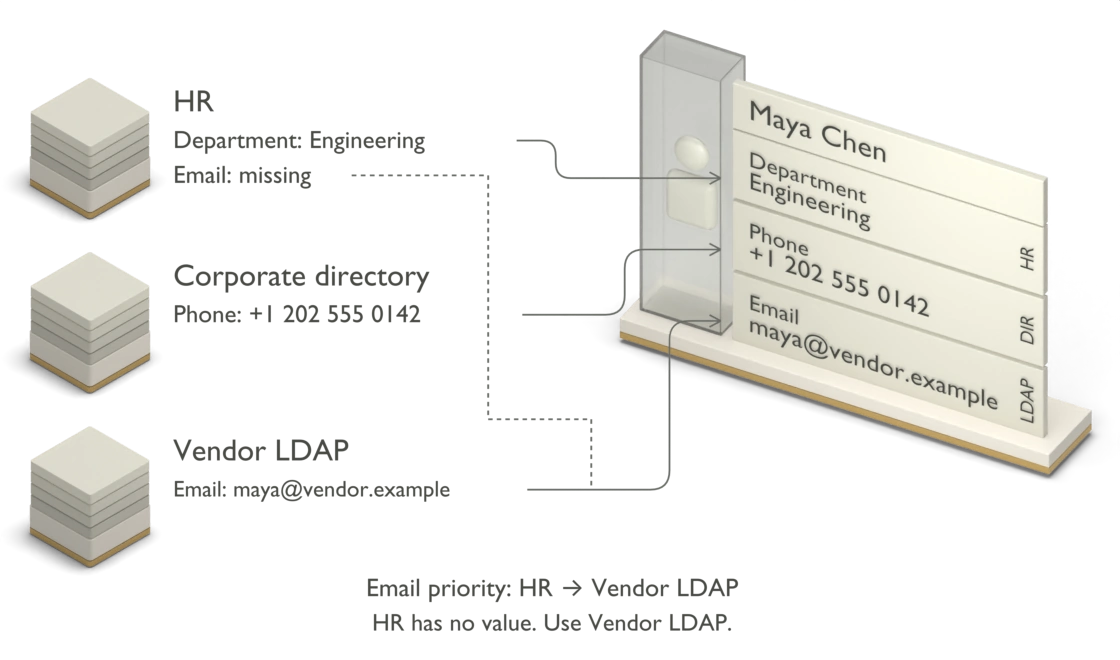
Preview policy changes and limit unexpected removals.
See who gains or loses access before a policy change goes live. If upstream data triggers unexpected removals, Owlie pauses further revocations at your configured threshold and alerts an operator.
Inspect policy safety →
You set the intent. Owlie continuously maintains it.
Define the access state you want. Owlie compares it with reality, builds the changes required to get there, and continuously reconciles as systems, requirements, and connections change.
See how provisioning works →
Fits the environment you have.
Start with catalog connectors and standards. Reach private systems through an outbound-only gateway. Extend the parts that are specific to your business.
Your sources
HR, directories, SaaS, cloud, databases, and files.
Your connection methods
Provisioning and sync connectors, SCIM, LDAP, SQL, CSV, and private-network gateways.
Your fulfillment paths
Connector automation, tenant Functions, and tracked human work.
When the standard path stops fitting.
Extend Owlie with Functions, OXL, Custom Actions, and connectors—right where your workflows need them.
Functions
Run custom TypeScript in an isolated environment. Plug code into approval checks, fulfillment steps, provisioning hooks, or reactions to change.
Isolated runtime
Run your logic in an environment separate from the rest of the application.
Typed inputs and outputs
Work with a defined context and return the result your workflow needs.
Versioned
Keep track of changes as your functions evolve.
Owlie Expression Language
Use expressions for mappings, conditions, and value transforms. Define how source data becomes the values your workflows need.
One language across the workflow
Use OXL in attribute mappings, policy conditions, and forms.
Transform values
Combine fields, apply conditions, and supply fallback values.
Keep simple logic inline
Write an expression where you need a value, without creating a separate function.
Custom Actions
Add your own admin actions to identities and requests, with a named button, a form you define, and the logic behind it.
Define the form
Choose the fields, defaults, and validation for the operator’s input.
Placed where it is used
Make the action available from the identity or request being worked on.
Permissioned and logged
Control who can run the action and trace its execution.
Connector Builder
Build and version connectors for your own systems. Define operations, map fields, and test how the connector works with your data.
Operation by operation
Define how to list, create, update, and deactivate accounts.
Discover and map fields
Connect your system’s data to the fields Owlie uses.
Versioned releases
Keep connector changes in named versions.
Owlie Expert Services
Don’t want to implement another IGA platform? We’ll do it with you.
Owlie’s identity engineers work directly with your team to migrate your existing environment, connect applications, configure governance, and get Owlie into production. Fixed scope, fixed fee, then it’s yours.
- Salesforce— running in Owlie
- Workday— running in Owlie
- GitHub— running in Owlie
- AWS— running in Owlie
- Databricks— running in Owlie
Owlie is built for security-sensitive access work.
Bring a workflow, an awkward integration, or a policy you need to get right, and run it on the free plan. No sales call is required, but we’re glad to walk through it with you.
Sign up free →Or take the product tour →